
Some shops handle registration on their own and do not have access to our site. For those events online registration is disabled. Whenever available we will list the appropriate contact information on the Event Registration page.
Month: October 2019
Online pre-registration closes at midnight on the Friday before the shoot (Thursday night). We typically leave immediately following work on Friday to head to the tournament venues and frequently do not have access to the website after Thursday evening.
No. Everyone must pre-register for themselves.
- You must have previously Signed Up as a user on PNWShootup.com in order to register for an event online. If you have not previously signed up, you can get instructions by clicking here.
- Navigate to the Event page for the shoot you are trying to register for. There are three different ways you could get there. Any of them will work:
- Click on the Tournament Schedule link in the Header, then click on the title of the event you want to register for. Note: On mobile devices, the Header may be hidden behind a menu button that looks like this:

- Click on an Event Registration Button in a post
- Click on the title of the event in the Next Shoot service at the bottom of the home page
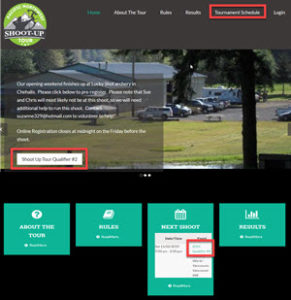
- Click on the Tournament Schedule link in the Header, then click on the title of the event you want to register for. Note: On mobile devices, the Header may be hidden behind a menu button that looks like this:
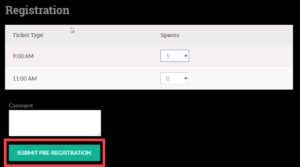
- Select which time you want to shoot
- Click the Submit Pre-Registration button
- There are two places where you can access the Sign Up form
- Click the Sign Up Button on the Login page
- Click the Sign Up Link on any Event Registration Page. PLEASE NOTE: On some mobile devices you may need to rotate your phone 90 degrees to Landscape mode in order to see the Login/Sign Up widget
- Enter all of the required information:
- User Name. This is is the name you will login with in the future
- First Name
- Last Name
- Password. Password must be a minimum of 8 characters
- You will receive a confirmation email. You must click the link in the email to complete your Sign Up process