The Cookshack Open for Finals Weekend!

Just wanted to let you know that Cascadian has decided to have the Cookshack open for Finals Weekend, so that our shoots won’t have to leave the premises in order to get lunch, etc.  I know that I for one will be taking advantage of this, both because its convenient but also because its an easy way to help support the club!


Hello Everyone,

We are about halfway through the season now, and I wanted to give a quick update of how things are going, check in on who’s qualified for Finals already and who may still need to get some scores in, and do some housecleaning on the overall placement list.   Please click through for more details:

ReadMore

Well… another year, and another unnecessary controversy we need to address.  This time it revolves around swapping targets from the top bale to the bottom bale after 5 scoring ends… if you can believe that.  Please click through for important changes for the remainder of the year, and a bit of a rant.

ReadMore

If the shoot is full the Event registration page will say so.

Registration closes at 12:00AM on the Friday before the shoot (Thursday night).  You may still come to the shoot and register in person, but you can no longer register early and have a guaranteed spot.

Some shoots handle their own registration and do not have access to the Website.  In those cases, the Event registration page will say that registration is unavailable.

Online pre-registration closes at midnight on the Friday before the shoot (Thursday night).  We typically leave immediately following work on Friday to head to the tournament venues and frequently do not have access to the website after Thursday evening.

  1. You must have previously Signed Up as a user on PNWShootup.com in order to register for an event online.  If you have not previously signed up, you can get instructions by clicking here.
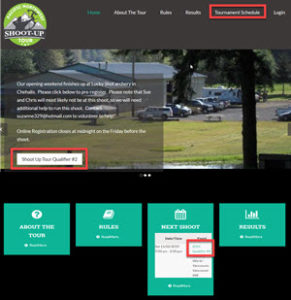
  2. Navigate to the Event page for the shoot you are trying to register for.  There are three different ways you could get there.  Any of them will work:
    1. Click on the Tournament Schedule link in the Header, then click on the title of the event you want to register for.  Note: On mobile devices, the Header may be hidden behind a menu button that looks like this: 
    2. Click on an Event Registration Button in a post
    3. Click on the title of the event in the Next Shoot service at the bottom of the home page
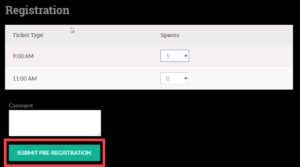
  3.  Select which time you want to shoot
  4. Click the Submit Pre-Registration button